


Operating system

ProtypeOS

Industrial operating system for 3D printers and filament dryers

ProtypeOS — the operator interface on the printer screen

Starting prints, calibration, drying and job history — from the touchscreen.

01

Profiles and Scenarios

  • Ready profiles for industrial tasks
  • Clear scenarios: start, print, finish
  • Print resumption with operator involvement
02

Log and Diagnostics

  • Print job history
  • Clear error messages
03

Drying and Printing

  • Dryer integrated into workflow
  • Drying temperature set from the printer screen

Interface

ProtypeOS operator interface

CD400 home screen: job status, chamber camera, temperatures of the hotends, bed, chamber and dryers, axis control.
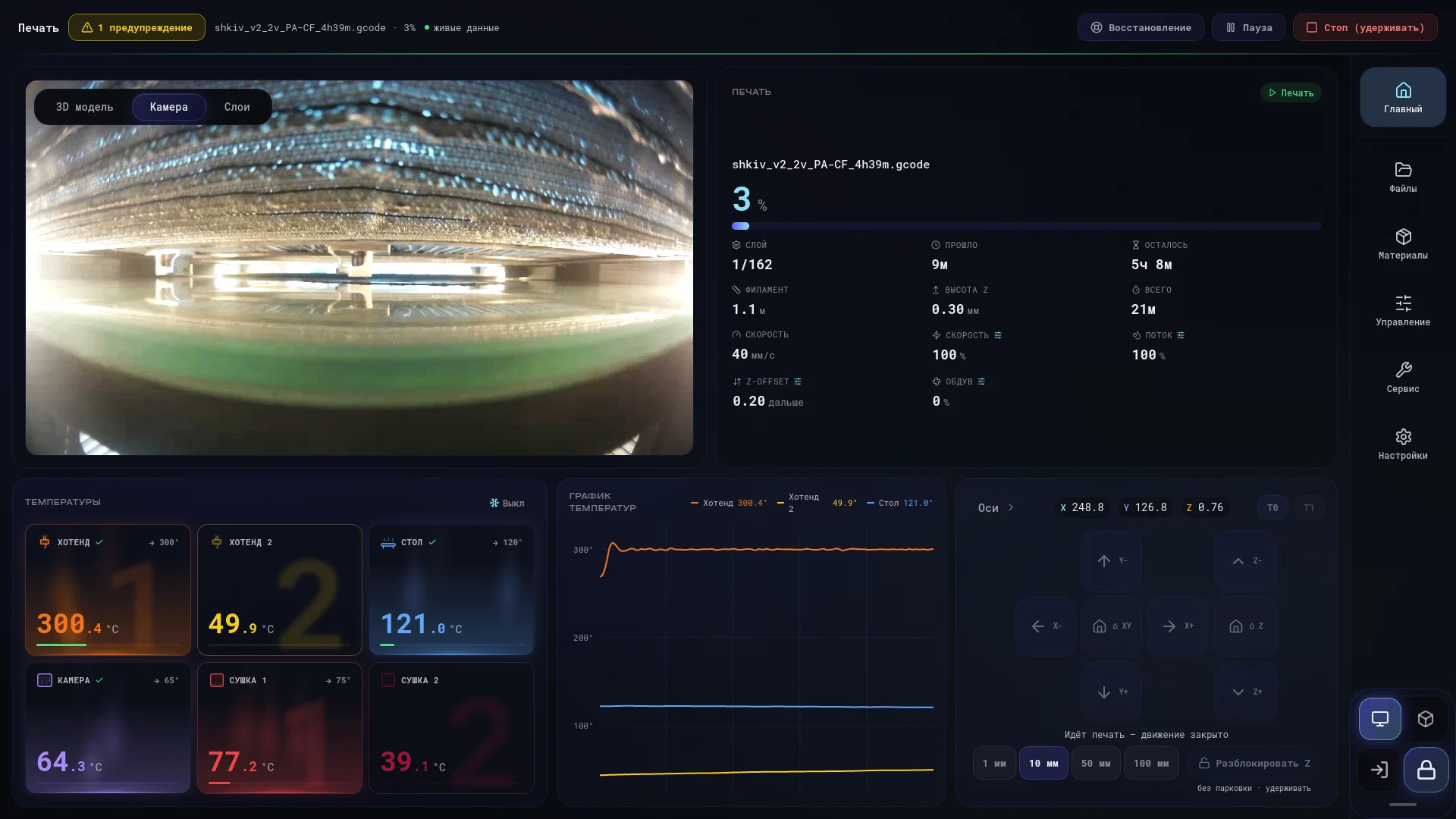
ProtypeOS home screen on a CD400 3D printer during printing: camera, job progress, temperatures
ProtypeOS home screen during printing, CD400.

Ecosystem

How the components connect

Slicer, printer and remote management work as one system. No port forwarding or public IP needed: the tunnel is established from the inside.

Preparation

Protype Slicer

  • Material profiles
  • IDEX modes
  • Network send
Job over network

Printer control unit

ProtypeOS

  • Operator interface
  • Klipper
  • FilaCore
  • Camera
  • Calibration
Secure VPN

Remote

ProtypeHub

  • iOS
  • Android
  • macOS
  • Camera and queue
Network updates

Protype server

Updates

  • Signed packages
  • Rollback on failure

Capabilities

ProtypeOS functions

The essentials, from the printer's touchscreen.

Calibration from the control unit

Step-by-step wizards on screen, no laptop needed.

  • PID
  • Pressure Advance
  • Z-offset
  • XY skew

Network updates

New versions install from the screen, outside of printing.

  • Signed packages
  • Rollback on failure

Access via VPN

The printer establishes a secure tunnel itself.

  • No public IP
  • No port forwarding
  • Pairing by code

Materials and drying

Automatic filament switchover to a backup spool.

  • Filament sensors
  • Drying chambers
  • Material check

Roles and access

Access is granted with a role and revoked instantly.

  • Owner
  • Administrator
  • Operator
  • Viewer

Recovery

Restart Klipper and services from any screen.

  • Locked while printing
  • Plain-language errors

What speeds up the launch

Deployment, printing, payback

1

Deployment

ProtypeOS and ready profiles speed up printer launch.

2

Results

IDEX, auto-calibration, and Hub monitoring — errors are visible during printing.

3

Payback

We calculate payback for your part.

Deployment
Results
Payback

One printer is in view from your desk. A fleet with deadlines needs a system.

ProtypeOS, ProtypeHub and Secure VPN: role-based access, print history, remote service.